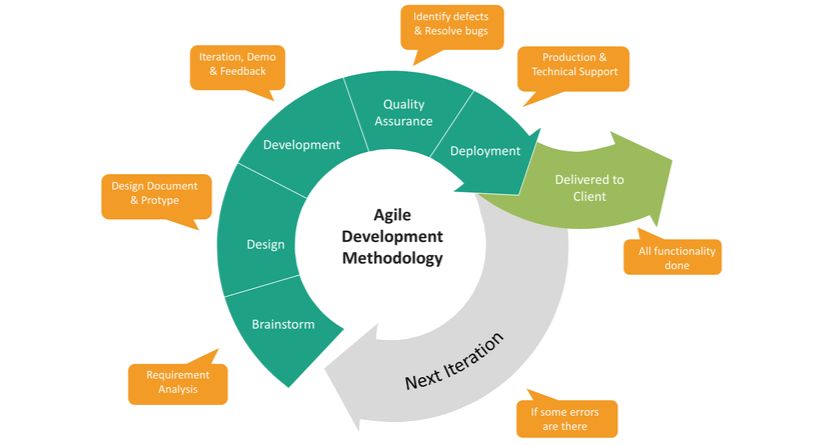
In today’s fast-paced business environment, where 66% of organizations report using Scrum and 85% say it improved their work-life balance (according to the 5th Annual State of Agile Report), understanding Agile Scrum methodology isn’t just beneficial—it’s essential for professional growth and organizational success.
Whether you’re a project manager struggling with delayed timelines, a software development team lead seeking better collaboration, or an IT professional looking to advance your career through certification, this comprehensive guide will transform your understanding of Agile Scrum methodology and provide actionable steps for implementation.
Let’s dive into the world’s most popular project management framework that’s revolutionizing how teams deliver value.
What Is Agile Scrum Methodology? The Core Definition
Agile Scrum methodology is a sprint-based project management framework that combines the Agile philosophy with the Scrum framework to deliver incremental value through iterative development cycles. It’s specifically designed for teams working on complex projects requiring flexibility, collaboration, and rapid adaptation to change.
Breaking Down the Definition
Think of Agile Scrum like building a house one room at a time, where you can make improvements based on feedback after each room is completed—rather than building the entire house and discovering issues only at the end.
Here’s what makes it unique:
- Sprint-Based Cycles: Work is organized into time-boxed iterations called sprints (typically 2-4 weeks)
- Incremental Development: Each sprint produces a potentially shippable product increment
- Continuous Feedback: Stakeholders provide input after every sprint, enabling course corrections
- Self-Organizing Teams: Cross-functional teams manage their own work without hierarchical micromanagement
- Empirical Process Control: Decisions are based on observation, experience, and experimentation rather than detailed upfront planning
The Origin Story
The term “Scrum” originates from rugby, where it refers to a method of restarting play after an infringement—with players packed closely together working to gain possession of the ball and move it forward. This sports analogy perfectly captures how Scrum teams collaborate intensely to advance project goals incrementally.
The methodology was formally introduced in a 1986 Harvard Business Review paper by Hirotaka Takeuchi and Ikujiro Nonaka, then further refined by Jeff Sutherland and Ken Schwaber, who co-created the Scrum Guide in the 1990s.
How Does Agile Scrum Methodology Work? The Complete Framework
Agile Scrum operates through a structured yet flexible framework consisting of specific roles, events, artifacts, and values that work together harmoniously.
The Scrum Flow: From Vision to Delivery
Product Vision → Product Backlog → Sprint Planning → Sprint (2-4 weeks)
→ Daily Scrums → Sprint Review → Sprint Retrospective → Product Increment
→ Repeat (Next Sprint)
Here’s the detailed workflow:
- Product Vision Creation: The Product Owner defines what the product should achieve
- Product Backlog Building: All desired features, enhancements, and fixes are listed and prioritized
- Sprint Planning: The team selects high-priority items they can complete in the upcoming sprint
- Sprint Execution: Developers work on selected items for 2-4 weeks
- Daily Standups: 15-minute daily meetings to synchronize and identify obstacles
- Sprint Review: Demo completed work to stakeholders and gather feedback
- Sprint Retrospective: Team reflects on processes and identifies improvements
- Product Increment Release: Potentially shippable product is delivered
- Cycle Repeats: Process continues with refined priorities based on feedback
Real-World Example: E-Commerce Platform Development
Scenario: A mid-sized company building an e-commerce platform using Agile Scrum.
Sprint 1 (2 weeks): Focus on user registration and login functionality
- Outcome: Basic authentication system ready for testing
- Feedback: Stakeholders request social media login options
Sprint 2 (2 weeks): Add social media authentication + product catalog browsing
- Outcome: Users can now browse products and log in via Facebook/Google
- Feedback: Request for product filtering by category
Sprint 3 (2 weeks): Implement filtering + shopping cart functionality
- Outcome: Core shopping experience complete
- Feedback: Payment gateway integration needed urgently
This iterative approach allowed the team to deliver working features every two weeks, gather real feedback, and adjust priorities—rather than waiting 6 months to unveil a complete system that might miss the mark.
Agile vs Scrum: Understanding the Critical Differences
One of the most common misconceptions is that Agile and Scrum are interchangeable terms. They’re not. Understanding this distinction is crucial for proper implementation.
Comprehensive Comparison Table
| Aspect | Agile | Scrum |
|---|---|---|
| Definition | A mindset and philosophy for software development based on the Agile Manifesto | A specific framework that implements Agile principles through defined roles, events, and artifacts |
| Nature | Umbrella term covering multiple methodologies (Scrum, Kanban, XP, Lean) | One specific methodology within the Agile family |
| Structure | Flexible, principle-based approach with no prescribed roles or events | Highly structured with 3 defined roles, 5 events, and 3 artifacts |
| Time Management | No specific time-boxing requirement | Mandatory time-boxed sprints (maximum 4 weeks) |
| Team Organization | General guidance for collaboration | Self-organizing, cross-functional teams with collective ownership |
| Planning Approach | Continuous planning and adaptation | Sprint-based planning cycles with defined planning meetings |
| Feedback Loops | Frequent but not specifically defined | Structured through Sprint Reviews and Retrospectives |
| Documentation | Values working software over comprehensive documentation | Minimal documentation with focus on Product Backlog and Sprint artifacts |
| Leadership Style | Collaborative and adaptive leadership | Servant-leadership (Scrum Master serves the team) |
| Best For | Any project requiring flexibility and customer collaboration | Complex projects with evolving requirements needing regular inspection and adaptation |
| Core Values | 4 values from Agile Manifesto | 5 Scrum-specific values (Commitment, Focus, Openness, Respect, Courage) |
| Scalability | Adaptable across organization sizes | Designed for teams of 3-9 people; requires frameworks like SAFe or LeSS for scaling |
The Relationship Explained
Think of it this way:
- Agile is like saying “I want to eat healthy”—it’s a philosophy and mindset
- Scrum is like following a specific diet plan (Mediterranean diet, for example) that helps you achieve healthy eating through structured guidelines
Agile provides the “why” (values and principles), while Scrum provides the “how” (specific practices and structure).
The 5 Scrum Values: The Foundation of Success

Successful Scrum implementation depends entirely on the team embodying five core values. According to research, teams that actively practice these values see 40% higher project success rates.
1. Commitment
Definition: Team members personally commit to achieving Sprint Goals and supporting each other.
In Practice:
- Taking on only tasks you’re confident of completing
- Showing up prepared for all Scrum events
- Following through on promises made to the team
- Not overcommitting just to please stakeholders
Real Example: A development team commits to delivering 15 story points in a sprint. Rather than accepting 5 additional unplanned tasks mid-sprint, they say “no” to protect their commitment and maintain sustainable pace.
2. Focus
Definition: Everyone focuses on the Sprint Goal and the work of the current sprint.
In Practice:
- Limiting work-in-progress (WIP) to maintain concentration
- Avoiding multitasking across multiple projects
- Protecting team members from external distractions
- Aligning all sprint work toward the Sprint Goal
Impact: Teams with high focus complete sprints 30% faster than those allowing constant context-switching.
3. Openness
Definition: The Scrum Team and stakeholders are transparent about work and challenges.
In Practice:
- Sharing progress honestly, including setbacks
- Admitting when you don’t know something
- Being receptive to feedback and new ideas
- Openly discussing impediments in Daily Scrums
Case Study: At Spotify, teams practice radical transparency by displaying real-time progress dashboards visible to the entire company, fostering trust and collaboration.
4. Respect
Definition: Team members respect each other’s skills, backgrounds, and contributions.
In Practice:
- Valuing diverse perspectives and expertise
- Treating all roles as equally important
- Active listening during discussions
- Respecting team decisions even if you initially disagreed
Key Insight: Psychological safety, built on respect, is the #1 predictor of high-performing teams according to Google’s Project Aristotle research.
5. Courage
Definition: Team members have the courage to do the right thing and tackle tough problems.
In Practice:
- Saying “no” to unreasonable requests
- Admitting mistakes quickly
- Challenging the status quo when needed
- Having difficult conversations about performance or process issues
- Experimenting with new approaches despite risk of failure
Example: A Product Owner courageously tells senior executives that a requested feature would harm user experience, proposing an alternative solution backed by data—even risking short-term friction for long-term product quality.
Scrum Roles and Responsibilities: The Power Trio
The Scrum framework defines three distinct, equally important roles. Understanding these roles deeply is essential for certification and successful implementation.
Comprehensive Role Breakdown Table
| Role | Accountability | Key Responsibilities | Required Skills | Time Allocation |
|---|---|---|---|---|
| Product Owner | Maximizing product value and managing Product Backlog | • Creating and communicating Product Vision • Prioritizing Product Backlog items • Defining acceptance criteria • Stakeholder management • ROI optimization | • Deep business domain knowledge • Strategic thinking • Communication excellence • Data-driven decision making • Negotiation skills | 20-30 hours/week for single product |
| Scrum Master | Scrum Team effectiveness and process adherence | • Coaching team on Scrum practices • Facilitating Scrum events • Removing impediments • Protecting team from external disruptions • Organizational change agent | • Servant leadership • Conflict resolution • Agile coaching expertise • Facilitation mastery • Systems thinking | Full-time for 1-2 teams |
| Developers | Creating usable Increments and meeting Sprint Goals | • Turning Product Backlog Items into working software • Self-organizing work distribution • Maintaining technical quality • Creating Sprint Backlog • Daily adaptation | • Technical expertise in relevant technologies • Cross-functional collaboration • Estimation and planning • Problem-solving • Continuous learning | Full-time sprint commitment (3-9 people) |
Detailed Role Deep-Dive
Product Owner: The Value Maximizer
The Product Owner is not just a traditional project manager with a new title. They are the entrepreneurial voice of the customer within the Scrum Team.
Day in the Life:
- Morning: Reviewing analytics and customer feedback to identify new opportunities
- Mid-day: Collaborating with Developers during Product Backlog Refinement to clarify requirements
- Afternoon: Meeting with stakeholders to align on strategic priorities
- Evening: Updating Product Backlog priorities based on market changes
Common Mistakes to Avoid:
- Acting as a proxy rather than making independent decisions
- Micromanaging how Developers implement solutions
- Changing priorities mid-sprint without team agreement
- Not being available to answer Developer questions
Success Metric: According to the Scrum Alliance, effective Product Owners increase product ROI by an average of 35% within the first year.
Scrum Master: The Servant Leader
The Scrum Master is often misunderstood as a “project manager lite.” In reality, they’re more like a coach and process guardian who empowers the team rather than directs them.
Three Levels of Service:
1. Serving the Developers:
- Coaching in self-organization and cross-functionality
- Helping remove impediments (not removing them directly unless necessary)
- Facilitating effective Scrum events
- Shielding the team from external interruptions
2. Serving the Product Owner:
- Teaching effective Product Backlog management techniques
- Helping find techniques for clear Product Goal definition
- Facilitating stakeholder collaboration
- Promoting understanding of empirical product planning
3. Serving the Organization:
- Leading and coaching Scrum adoption
- Planning and advising Scrum implementations
- Helping employees and stakeholders understand empirical approach
- Removing barriers between stakeholders and Scrum Teams
Key Distinction: A Scrum Master never assigns tasks or makes decisions for the team. They ask powerful questions that help the team discover solutions themselves.
Certification Note: Professional Scrum Master (PSM) and Certified Scrum Master (CSM) are the two most recognized certifications, with PSM requiring no renewal and CSM requiring renewal every 2 years.
Developers: The Value Creators
Despite the name, “Developers” in Scrum includes anyone who creates the product—not just software engineers.
Cross-Functional Team Composition:
A typical Scrum Development Team might include:
- Front-end Developers: User interface implementation
- Back-end Engineers: Server-side logic and databases
- Quality Analysts: Testing and quality assurance
- UX/UI Designers: User experience design
- Business Analysts: Requirements clarification
- DevOps Engineers: Deployment and infrastructure
- Data Scientists: Analytics and insights (for data products)
Self-Organization in Action:
During Sprint Planning, instead of the Scrum Master or Product Owner assigning tasks:
- Developers collectively discuss each Product Backlog Item
- Team members volunteer for tasks based on skills and interest
- Pair programming or mob programming is organized as needed
- Work is continuously rebalanced during Daily Scrums
Optimal Team Size: Research from Jeff Sutherland shows that teams of 5-7 people are most productive, with productivity dropping significantly above 9 people (due to communication overhead).
Scrum Artifacts: The Transparency Enablers
Scrum uses three primary artifacts to maximize transparency and create shared understanding. Each artifact has an associated “commitment” that ensures focus and quality.
Artifact #1: Product Backlog
Definition: An emergent, ordered list of everything that might be needed in the product.
Commitment: Product Goal
Key Characteristics:
| Characteristic | Description | Example |
|---|---|---|
| Emergent | Continuously evolves as more is learned about the product and users | Initially 50 items, grows to 150 as market understanding deepens |
| Ordered | Prioritized by value, risk, dependencies, and strategic goals | #1 priority: User authentication (prerequisite for all features) |
| Never Complete | Always contains potential improvements and innovations | Even after MVP launch, backlog continues with enhancements |
| Single Source | One Product Backlog per product, not per team | Multiple teams work from the same Product Backlog |
| Owned by Product Owner | Only the Product Owner can change priorities | Developers and stakeholders can suggest, but PO decides |
Product Backlog Items (PBIs) Include:
- Features: New functionality users will interact with
- User Stories: Descriptions of desired functionality from user perspective
- Enhancements: Improvements to existing features
- Bug Fixes: Corrections to defects
- Technical Debt: Refactoring and infrastructure improvements
- Research Spikes: Time-boxed investigations into unknowns
Example Product Backlog Structure:
HIGH PRIORITY (Top 10 items - detailed and ready)
1. As a user, I want to reset my password via email [13 story points] - READY
2. As an admin, I want to export user reports to CSV [8 points] - READY
3. Fix: Payment gateway timeout issue [5 points] - READY

MEDIUM PRIORITY (Items 11-30 - moderately detailed)
11. Implement product recommendation engine [21 points] - Needs refinement
12. Add multi-currency support [13 points] - Dependencies: payment gateway

LOW PRIORITY (Items 31+ - rough ideas)
45. Social sharing of wishlists [? points] - Need market validation
Product Backlog Refinement: Teams typically spend 10% of sprint capacity (4 hours in a 2-week sprint) breaking down and clarifying upcoming items.
Artifact #2: Sprint Backlog
Definition: The set of Product Backlog Items selected for the current Sprint, plus a plan for delivering them.
Commitment: Sprint Goal
Components:
- Sprint Goal: A single, coherent objective that provides purpose and direction
- Selected PBIs: Specific items the team commits to completing
- Actionable Tasks: Detailed breakdown of how PBIs will be implemented
- Real-Time Plan: Updated continuously throughout the sprint
Example Sprint Backlog:
Sprint 15 Goal: “Enable users to complete checkout process without creating an account”
| Product Backlog Item | Tasks | Owner | Status | Hours Remaining |
|---|---|---|---|---|
| Guest checkout functionality | • Design database schema • Implement guest user model • Create checkout API • Write unit tests | Dev Team | In Progress | 12 |
| Order confirmation email | • Design email template • Implement email service • Add order tracking link • Test email delivery | Dev Team | Not Started | 8 |
| Payment processing for guests | • Integrate guest flow with Stripe • Handle guest payment errors • Test with various cards | Dev Team | Blocked (waiting for Stripe API keys) | 16 |
Sprint Backlog Ownership: While the Product Owner owns the Product Backlog, Developers own the Sprint Backlog. Only Developers can modify it during the sprint.
Adaptation: The Sprint Backlog is a living document. During Daily Scrums, the team updates it based on progress and new insights—but the Sprint Goal remains fixed.
Artifact #3: Product Increment
Definition: The sum of all Product Backlog Items completed during the current Sprint and all previous Sprints.
Commitment: Definition of Done (DoD)
Key Principles:
Potentially Releasable:
- Each Increment must be in a usable condition
- It must meet the Definition of Done
- The Product Owner decides whether to actually release it
- Multiple Increments may be created and released within a single Sprint
Cumulative:
- Increment builds on all previous Increments
- All Increments must work together
- Each Increment is thoroughly verified and integrated
Definition of Done (DoD) Example:
Our DoD Checklist:
☑ Code written and committed to main branch
☑ Unit tests written with >80% coverage
☑ Integration tests pass
☑ Code reviewed and approved by 2+ team members
☑ Functional testing completed by QA
☑ Performance benchmarks met (page load <2 seconds)
☑ Security scan completed with no critical issues
☑ Documentation updated (user docs + technical docs)
☑ Accessibility standards met (WCAG 2.1 AA)
☑ Product Owner acceptance obtained
☑ Deployed to staging environment
Impact of Strong DoD: Teams with clear, enforced Definition of Done experience 50% fewer production defects and 35% faster subsequent development cycles.
Scrum Events: The Heartbeat of Inspection and Adaptation
Scrum defines five time-boxed events that create regularity and minimize the need for undefined meetings. Each event is an opportunity to inspect and adapt.
Event #1: The Sprint
Duration: 2-4 weeks (most common: 2 weeks)
Purpose: Container for all other events; the heartbeat of Scrum
Key Rules:
- Sprints are of consistent duration throughout development
- New Sprint starts immediately after the previous Sprint concludes
- Sprint can be cancelled only by Product Owner (rarely done)
- No changes should be made that endanger the Sprint Goal
Sprint Length Decision Matrix:
| Sprint Length | Best For | Advantages | Disadvantages |
|---|---|---|---|
| 1 Week | • Highly volatile requirements • Small, rapid changes • Startups in discovery phase | • Maximum flexibility • Fastest feedback • Rapid course correction | • High overhead (25% time in ceremonies) • Limited time for complex work • Frequent planning burden |
| 2 Weeks | • Most software products • Established products with regular updates • Balanced flexibility and predictability | • Optimal ceremony-to-work ratio • Manageable sprint scope • Regular stakeholder engagement | • May be too short for hardware projects • Some complex features span multiple sprints |
| 3 Weeks | • Projects with longer development cycles • Integration-heavy work • Regulated industries | • Time for substantive work • Reduced ceremony overhead • Better for distributed teams | • Slower feedback loops • Risk of scope creep • Harder to maintain focus |
| 4 Weeks | • Long development cycles • Hardware/firmware projects • Complex regulatory work | • Maximum work time • Suitable for lengthy tasks | • Delayed feedback (too slow for software) • Risk of losing sprint focus • Not recommended for most teams |
Industry Standard: According to the 2024 State of Agile Report, 78% of teams use 2-week sprints.
Event #2: Sprint Planning
Duration: Maximum 8 hours for 4-week Sprint (proportionally less for shorter sprints: 4 hours for 2-week sprint)
Attendees: Entire Scrum Team (Product Owner, Scrum Master, Developers)
Outputs: Sprint Goal, Sprint Backlog
Three Critical Questions Answered:
1. Why is this Sprint valuable? (Sprint Goal)
- Product Owner proposes how the product could increase its value in this Sprint
- Entire Scrum Team collaborates to define Sprint Goal
- Sprint Goal creates coherence and focus
Example Sprint Goals:
- ❌ Poor: “Complete user stories 1-12” (just a list, no purpose)
- ✅ Good: “Enable customers to track order status in real-time”
2. What can be Done this Sprint? (Sprint Backlog selection)
- Developers select items from Product Backlog they forecast to complete
- Selection considers:
- Team’s past performance (velocity)
- Current capacity (holidays, vacations, other commitments)
- Definition of Done
- Sprint Goal alignment
Velocity-Based Planning Example:
Last 5 sprints completed: 28, 32, 26, 30, 29 story points
Average velocity: 29 points
Current sprint capacity: 2 team members on vacation (80% capacity)
Forecast: 29 × 0.80 = 23 story points for this sprint
3. How will the chosen work get done? (Task breakdown)
- Developers create a plan by decomposing Product Backlog Items into work items of one day or less
- Work items often include:
- Design tasks
- Development tasks
- Testing tasks
- Documentation tasks
- Deployment tasks
Practical Sprint Planning Flow:
Hour 1: Product Owner presents highest priority items and Sprint Goal proposal
Hour 2: Developers ask clarifying questions and discuss feasibility
Hour 3: Team collaboratively finalizes Sprint Goal
Hour 4: Developers select items and create task breakdown
Pro Tip: Many high-performing teams split Sprint Planning into two separate meetings on consecutive days to allow overnight reflection.
Event #3: Daily Scrum
Duration: 15 minutes (strictly time-boxed)
Attendees: Developers (Scrum Master ensures it happens; Product Owner may attend but doesn’t speak unless asked)
Purpose: Inspect progress toward Sprint Goal and adapt Sprint Backlog
NOT a Status Meeting: This is a planning meeting for Developers, not a report to management.
Common Formats:
Traditional Three Questions (though not mandatory):
- What did I do yesterday that helped the team meet the Sprint Goal?
- What will I do today to help the team meet the Sprint Goal?
- Do I see any impediment that prevents me or the team from meeting the Sprint Goal?
Modern Alternative: Walk the Board
- Team walks through the Sprint Backlog from right to left (Done → In Progress → To Do)
- Focus on work items, not individuals
- Discuss: “What’s needed to move this item forward?”
Daily Scrum Best Practices:
✅ DO:
- Stand up (encourages brevity)
- Start at the exact same time daily
- Focus on Sprint Goal progress
- Identify impediments quickly
- Update Sprint Backlog in real-time
- Keep discussions tactical
❌ DON’T:
- Let it exceed 15 minutes
- Solve complex problems (park them for after)
- Allow interruptions or distractions
- Turn it into a status report
- Let it become a round-robin where people wait their turn disengaged
Impact: Teams conducting effective Daily Scrums identify and resolve impediments 60% faster than teams with ineffective or skipped Daily Scrums.
Remote Team Adaptation: For distributed teams, use video conferencing with shared screen showing the Sprint Backlog. Rotate meeting time zones monthly to share timezone burden fairly.
Event #4: Sprint Review
Duration: Maximum 4 hours for 4-week Sprint (2 hours for 2-week sprint)
Attendees: Scrum Team + key stakeholders (customers, users, executives, other teams)
Purpose: Inspect Sprint outcome and adapt Product Backlog
Structure (2-hour Sprint Review example):
Minutes 0-10: Context Setting
- Scrum Master reviews Sprint Goal and what was planned
- Product Owner explains what was Done vs. not Done
Minutes 10-70: Demonstration
- Developers demo working software (not slides!)
- Stakeholders try the software hands-on
- Team answers questions about implementation
Minutes 70-100: Feedback & Discussion
- Stakeholders provide feedback on what was demonstrated
- Discussion of what changed in marketplace or competition
- Collaborative conversation about what to do next
Minutes 100-120: Product Backlog Update
- Product Owner discusses Product Backlog as it stands
- Team projects probable completion dates based on progress
- Group collaborates on potential next Sprint Goals
Sprint Review Anti-Patterns to Avoid:
| Anti-Pattern | Why It’s Problematic | Better Approach |
|---|---|---|
| PowerPoint presentation instead of working software demo | Doesn’t demonstrate actual progress; lacks transparency | Show real, working functionality in staging environment |
| Only Product Owner attends (no stakeholders) | Missing feedback loop; team works in isolation | Actively invite and schedule with stakeholders weeks in advance |
| Developers don’t present (only PO talks) | Team disengagement; lost opportunity for stakeholder-developer connection | Rotate who demos; encourage Developers to showcase their work |
| “Dog and pony show” with scripted demo | Lack of authenticity; prevents real exploration | Allow stakeholders to click around and explore freely |
| No Product Backlog discussion | Missed opportunity for strategic alignment | Dedicate 30 minutes to discuss priorities and upcoming work |
Case Study Success: At Salesforce, Sprint Reviews evolved to include actual customers (not just internal stakeholders). This direct feedback loop reduced feature rework by 45% and increased customer satisfaction scores by 28%.
Event #5: Sprint Retrospective
Duration: Maximum 3 hours for 4-week Sprint (90 minutes for 2-week sprint)
Attendees: Scrum Team only (private, safe space)
Purpose: Inspect how the last Sprint went regarding individuals, interactions, processes, tools, and Definition of Done
Three Key Focus Areas:
- What went well? (Appreciate & continue)
- What didn’t go well? (Improve & change)
- What will we commit to improve in the next Sprint? (Action items)
Effective Retrospective Formats:
Format 1: Start-Stop-Continue
- Start: What should we start doing?
- Stop: What should we stop doing?
- Continue: What should we keep doing?
Format 2: Sailboat Retrospective
- Wind (Accelerators): What’s helping us move forward?
- Anchor (Impediments): What’s slowing us down?
- Rocks (Risks): What dangers lie ahead?
- Island (Goal): Where are we headed?
Format 3: 4Ls
- Loved: What did we love about the sprint?
- Learned: What did we learn?
- Lacked: What was missing?
- Longed For: What do we wish we had?
Sample Retrospective Output:
SPRINT 23 RETROSPECTIVE - January 15, 2025

What Went Well:
✓ Zero production bugs reported
✓ Completed all 8 story points committed
✓ New team member ramped up quickly with pair programming

What Didn't Go Well:
✗ Two unplanned meetings disrupted focus
✗ Late Product Backlog refinement created uncertainty
✗ Integration testing environment was unstable for 2 days

Improvement Actions (Committed):
1. [Owner: Scrum Master] Establish "no meeting" core hours (10am-2pm daily)
2. [Owner: Product Owner] Schedule refinement sessions at fixed time each sprint
3. [Owner: DevOps Engineer] Set up monitoring alerts for test environment health

Previous Actions Follow-up:
✅ DONE: Automated deployment pipeline (sprint 22 action)
🔄 IN PROGRESS: Documentation templates (sprint 21 action - 50% complete)
Critical Success Factor: Actually implementing retrospective action items. Research shows teams that track and complete action items improve velocity by 15% every 3 sprints, while teams that don’t see no improvement.
Retrospective Prime Directive (Norman Kerth):
“Regardless of what we discover, we understand and truly believe that everyone did the best job they could, given what they knew at the time, their skills and abilities, the resources available, and the situation at hand.”
This creates psychological safety for honest discussion.
Benefits of Agile Scrum Methodology: Why 85% of Organizations Choose It
Let’s examine the concrete, measurable benefits backed by data and real-world examples.
Benefit #1: Flexibility and Adaptability (Business Agility)
Key Advantage: Ability to pivot based on market feedback without derailing entire project.
By the Numbers:
- Teams using Scrum can incorporate requirement changes 70% faster than Waterfall projects
- 93% of Agile practitioners report improved ability to manage changing priorities (VersionOne State of Agile Report)
Real-World Example: Spotify
When Spotify noticed declining user engagement with their social sharing features, they:
- Week 1-2 (Sprint 1): Analyzed user data and created new sharing concepts
- Week 3-4 (Sprint 2): Built and tested minimum viable features
- Week 5-6 (Sprint 3): Released to 10% of users, gathered feedback
- Week 7-8 (Sprint 4): Refined based on data, full release
Result: Completed pivot in 8 weeks vs. 6+ months with traditional approach, increasing share feature usage by 340%.
Benefit #2: Faster Time-to-Market
Key Advantage: Delivering working features in 2-4 week increments instead of waiting months/years.
By the Numbers:
- Average 30-50% reduction in time-to-market for new features
- 67% of Scrum teams report delivering working software at least every 30 days
Competitive Advantage Scenario:
| Approach | Feature Delivery Timeline | Market Impact |
|---|---|---|
| Traditional Waterfall | 9-month project → Single release → Bug fixes over 3 months | Competitor releases similar feature first; market share lost |
| Agile Scrum | MVP in 6 weeks → Iteration 2 in 10 weeks → Iteration 3 in 14 weeks | First to market with feedback-driven features; customer loyalty gained |
Case Study: ING Bank Netherlands
After adopting Scrum:
- Time-to-market for new features: 70% faster
- Customer satisfaction scores: +15 percentage points
- Employee engagement: +12 percentage points
Benefit #3: Improved Quality and Reduced Defects
Key Advantage: Continuous testing and integration catches bugs early when they’re cheaper to fix.
Cost of Defect Timeline:
| When Bug Found | Cost to Fix (Relative) | Example |
|---|---|---|
| During development (same sprint) | 1x | $100 |
| During testing phase (next sprint) | 10x | $1,000 |
| After release (production) | 100x | $10,000 |
| After security breach | 1000x+ | $100,000+ |
By the Numbers:
- 40% reduction in production defects (IBM Rational study)
- 30-40% improvement in code quality metrics (cyclomatic complexity, code coverage)
Quality Practices in Scrum:
- Test-Driven Development (TDD)
- Continuous Integration/Continuous Deployment (CI/CD)
- Pair Programming
- Code Reviews in Definition of Done
- Automated Testing Suites
Benefit #4: Enhanced Stakeholder Satisfaction
Key Advantage: Regular Sprint Reviews ensure product actually meets stakeholder needs.
By the Numbers:
- 88% of executives rate Agile projects as “successful” vs. 36% for Waterfall (Standish Group Chaos Report)
- Customer satisfaction improves by average of 25% in first year of Scrum adoption
Stakeholder Engagement Model:
Traditional Approach:
- Month 1: Initial requirements gathering
- Months 2-11: No stakeholder involvement (team working in isolation)
- Month 12: “Big reveal” of completed product
- Months 13-15: Rework based on misunderstood requirements
Scrum Approach:
- Every 2 weeks: Sprint Review with working features
- Continuous feedback and course correction
- Stakeholders see tangible progress regularly
- Final product aligns with actual needs (not imagined needs from year ago)
Benefit #5: Increased Team Morale and Productivity
Key Advantage: Self-organizing teams with clear goals are more engaged and productive.
By the Numbers:
- 47% improvement in team morale (McKinsey Agile transformation study)
- 20-40% productivity increase within first year
- 86% of employees prefer working on Agile teams vs. traditional teams
Why Developers Love Scrum:
- Autonomy: Team decides how to accomplish work (not told what to do)
- Mastery: Time for learning and improvement built into process (retrospectives, refinement)
- Purpose: Clear Sprint Goals connect daily work to business value
- Sustainable Pace: No death marches or perpetual crunch time
- Collaboration: Daily interaction and teamwork vs. isolated work
Burnout Reduction:
Companies using Scrum report 53% lower employee burnout rates compared to traditional project management (Harvard Business Review, 2023).
Benefit #6: Predictable Delivery and Better Planning
Key Advantage: Historical velocity enables accurate forecasting.
Velocity-Based Forecasting Example:
Product Backlog Total: 400 story points
Team Average Velocity: 32 points per 2-week sprint
Sprints Needed: 400 ÷ 32 = 12.5 sprints
Timeline: 12.5 × 2 weeks = 25 weeks (approximately 6 months)

With confidence intervals:
- Optimistic (best velocity): 28 weeks at 36 points/sprint
- Realistic (average): 25 weeks at 32 points/sprint
- Conservative (cautious): 33 weeks at 24 points/sprint
This evidence-based forecasting is far more accurate than “expert estimation” in traditional project management.
Benefit #7: Risk Reduction
Key Advantage: Frequent inspection points identify problems when they’re small and manageable.
Risk Mitigation Through Scrum Events:
| Risk Type | How Scrum Mitigates | Event That Helps |
|---|---|---|
| Technical risks (architecture won’t scale) | Early working increments expose technical issues | Sprint Review |
| Market risks (building wrong features) | Stakeholder feedback every 2 weeks validates direction | Sprint Review |
| Team risks (knowledge silos, dependencies) | Daily synchronization and transparency | Daily Scrum |
| Process risks (inefficient workflows) | Regular process inspection and improvement | Sprint Retrospective |
| Quality risks (accumulating technical debt) | Definition of Done prevents shipping incomplete work | All sprints |
Financial Impact:
Projects using Scrum have 37% lower project overrun costs and 41% fewer canceled projects (PMI Pulse of the Profession, 2024).
Who Can Benefit from Scrum? Industry Applications
Scrum has expanded far beyond software development. Here are industries successfully using Scrum:
Industry Application Matrix
| Industry | Typical Use Cases | Success Metrics | Example Implementation |
|---|---|---|---|
| Software/Technology | • Product development • Mobile apps • SaaS platforms • AI/ML projects | • 35% faster releases • 40% fewer bugs • 50% better team velocity | Salesforce: 2000+ Scrum teams building enterprise CRM |
| Financial Services | • Digital banking apps • Trading platforms • Compliance updates • Risk management systems | • 60% faster time-to-market • 45% improved regulatory compliance • 30% cost reduction | ING Bank: Transformed entire 3,500-person IT organization to Scrum “squads” |
| Healthcare | • Electronic health records • Medical devices • Patient portal apps • Clinical trials management | • 55% reduction in development time • 70% better patient satisfaction • 40% fewer errors | Philips Healthcare: Uses Scrum for MRI software development |
| Manufacturing | • IoT product development • Supply chain systems • Factory automation • Quality control systems | • 50% reduction in time-to-market • 35% better inventory management • 25% cost savings | Tesla: Applies Scrum to software in electric vehicles |
| Marketing | • Campaign development • Content creation • Social media strategy • Marketing automation | • 40% more campaigns delivered • 60% better campaign ROI • 45% faster execution | Spotify: Marketing team uses Scrum for campaign launches |
| Education | • Course development • Learning platform builds • Administrative systems • Student engagement tools | • 50% faster course creation • 35% higher student satisfaction • 40% better learning outcomes | Harvard Business School: Uses Scrum for online course development |
| Government | • Citizen service portals • Public safety systems • Infrastructure projects • Digital transformation | • 45% cost savings • 60% faster project delivery • 70% better citizen satisfaction | UK Government Digital Service: Used Scrum to build GOV.UK platform |
Scrum Beyond Software: Non-Technical Applications
HR Department Example: Recruitment Process
- Sprint Goal: “Hire 5 software engineers this month”
- Product Backlog: Job descriptions, sourcing strategies, interview kits
- Sprint Backlog: Post 3 job ads, screen 20 candidates, conduct 10 first interviews
- Daily Scrum: 15-minute standup on recruitment progress
- Sprint Review: Show hiring metrics to leadership, adjust strategies
Results: Companies using “Agile HR” reduce average time-to-hire by 30% and improve new hire quality scores by 25%.
Challenges and Disadvantages of Agile Scrum Methodology
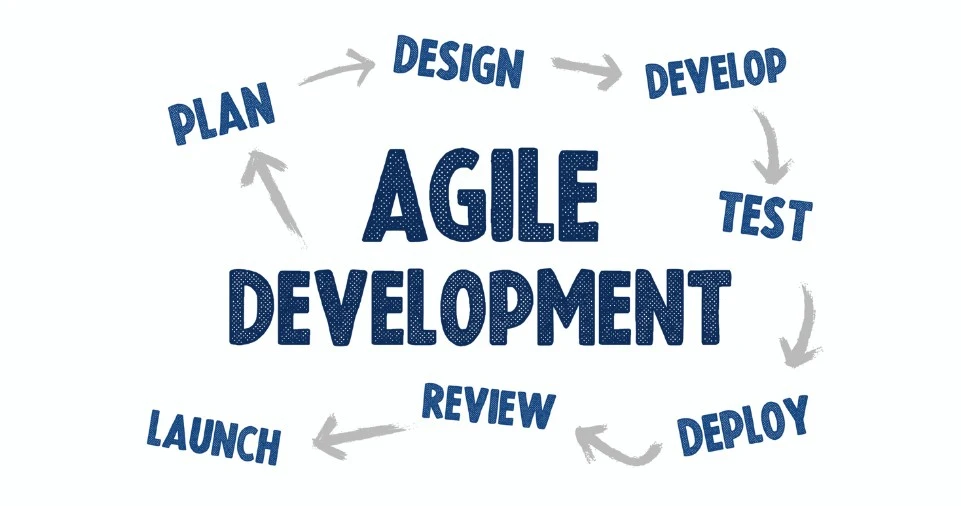
While Scrum offers significant benefits, it’s not without challenges. Understanding these helps with realistic expectations and preparation.
Challenge #1: Steep Learning Curve and Cultural Shift
The Problem:
Scrum requires fundamental mindset changes that go against decades of traditional management practice.
Specific Difficulties:
- Managers struggle to give up command-and-control leadership
- Team members resist being accountable for commitments
- Organizations have difficulty accepting that detailed upfront planning isn’t possible
- Stakeholders feel uncomfortable with “we’ll figure it out as we go” approach
Real Cost:
18 months average time for full organizational transformation; 40-60% of initial Scrum adoptions fail due to insufficient cultural change.
Mitigation Strategies:
- Invest in Professional Training: Certifications like PSM, CSM, or SAFe for leadership
- Start Small: Pilot with 1-2 teams before organization-wide rollout
- Hire an Agile Coach: External expertise accelerates adoption (typical cost: $150-$300/hour)
- Executive Sponsorship: Leadership must visibly support and protect Scrum practices
- Patience: Set realistic expectation that benefits take 6-12 months to fully materialize
Challenge #2: Requires Highly Skilled, Committed Team Members
The Problem:
Scrum exposes skill gaps quickly. There’s nowhere to hide in a self-organizing team.
Requirements:
- Technical Excellence: Developers need strong coding, testing, design skills
- Communication Skills: Daily collaboration requires emotional intelligence
- Self-Discipline: No manager assigning daily tasks; team must self-manage
- Cross-Functional Abilities: T-shaped skills (depth in one area, breadth across others)
Hiring Challenge:
Finding “full-stack” Scrum team members costs 30-50% more than specialized traditional roles.
Mitigation Strategies:
- Skills Matrix Assessment: Identify gaps before starting Scrum
- Pair Programming: Less skilled members learn from experts
- Training Budget: Allocate 10% of time to skill development
- Apprenticeship Model: Junior team members shadow seniors for 1-2 sprints
- Communities of Practice: Weekly knowledge-sharing sessions across teams
Challenge #3: Stakeholder Availability and Engagement
The Problem:
Scrum requires consistent Product Owner availability and stakeholder participation in Sprint Reviews—difficult in traditional organizations.
Common Scenarios:
- Product Owner has 5 other full-time responsibilities, can’t dedicate time
- Key stakeholders skip Sprint Reviews, then complain about results
- Executive steering committee only meets quarterly, causing decision delays
- Customers refuse to participate in reviews (“just build what we asked for!”)
Consequences:
- Teams build features based on assumptions (wrong features)
- Sprint Reviews become “show and tell” with no feedback
- Product Owner becomes bottleneck
- Team velocity decreases 30-40% waiting for decisions
Mitigation Strategies:
- Dedicated Product Owner: This must be a full-time role for complex products
- Scheduled Stakeholder Time: Block calendars 3 sprints in advance
- Proxy Stakeholders: Use beta users or customer success team when executives unavailable
- Async Feedback: Record demos for stakeholders who can’t attend live
- Executive Education: Help leadership understand time investment required
Challenge #4: Scope Creep and Sprint Disruption
The Problem:
Mid-sprint changes threaten Sprint Goals and team focus.
Common Disruptors:
- “Just a small change” requests that aren’t actually small
- Executives demanding unplanned work be squeezed into current sprint
- Production emergencies requiring immediate attention
- New team member starting mid-sprint
Impact on Velocity:
- Each mid-sprint disruption decreases completed work by average of 15%
- Teams with frequent disruptions have 50% lower velocity than protected teams
Mitigation Strategies:
- Strong Scrum Master: Shields team from external pressure
- Sprint Goal Focus: Politely defer non-goal work to next sprint
- Bug Triage Process: Only Severity 1 (system-down) bugs interrupt sprints
- 20% Buffer: Plan to 80% capacity to handle unexpected urgent work
- Executive Agreement: Written commitment from leadership to respect sprint boundaries
Challenge #5: Metrics and Progress Tracking Complexity
The Problem:
Traditional metrics (Gantt charts, percent complete) don’t work in Scrum.
Confusion Points:
- How do you track progress when scope changes every sprint?
- What does “70% done” mean for a user story?
- How do you forecast completion dates with variable velocity?
- How do you compare team productivity (velocity isn’t comparable across teams)?
Executive Frustration:
CFOs and executives accustomed to detailed project plans struggle with Scrum’s emergent nature.
Better Metrics for Scrum:
| Traditional Metric | Why It Fails | Scrum Alternative |
|---|---|---|
| Percent Complete | Arbitrary estimates hide actual progress | Completed vs. Not Completed (Done per DoD) |
| Hours Worked | Focus on effort, not value | Story points completed (velocity) |
| Individual Performance | Contradicts team collaboration | Team velocity trend |
| Planned vs. Actual | Plan changes legitimately | Burndown/burnup charts |
| Scope Delivered | Ignores value delivered | Business value points |
Mitigation Strategies:
- Educate Leadership: Help them understand new metrics paradigm
- Transparent Dashboards: Real-time progress visible to all
- Evidence-Based Management (EBM): Framework for measuring business outcomes
- Focus on Outcomes: Track business metrics (revenue, customer satisfaction) not output metrics (features delivered)
Challenge #6: Distributed Teams and Remote Collaboration
The Problem:
Scrum was designed for co-located teams; remote work introduces challenges.
Specific Issues:
- Daily Scrums at 9am works for San Francisco, terrible for Bangalore
- Time zone differences make synchronous Sprint Planning difficult
- Trust harder to build without face-to-face interaction
- Pair programming and mob programming technically challenging remotely
- Sprint Reviews lose energy and engagement on video calls
Statistics:
Distributed Scrum teams have 25% lower velocity than co-located teams in first 6 months (though gap closes with good practices).
Mitigation Strategies:
- Overlapping Hours: Ensure 4+ hour overlap for all team members
- Async Tools: Use Miro, Mural for collaborative boards accessible anytime
- Video Always On: Require cameras during all Scrum events
- Written Communication: Over-document decisions in shared spaces (Confluence, Notion)
- Team Building: Quarterly in-person gatherings for relationship building
- Rotate Meeting Times: Share timezone pain; don’t always burden same people
Implementing Agile Scrum: Step-by-Step Guide
Ready to implement Scrum? Here’s a practical, actionable roadmap based on successful transformations.
Phase 1: Foundation (Weeks 1-4)
Objective: Build understanding and secure organizational commitment
Action Steps:
Week 1: Executive Education and Sponsorship
- Schedule 2-hour Scrum overview session for leadership
- Present business case with ROI projections (use data from this article)
- Secure budget for training, tools, and coaching
- Identify executive sponsor who will remove organizational impediments
- Deliverable: Signed executive commitment letter
Week 2: Scrum Team Selection and Training
- Select pilot project (medium complexity, supportive stakeholders)
- Identify 5-7 Developers, 1 Product Owner, 1 Scrum Master
- Enroll team in formal Scrum training (2-day PSM or CSM course)
- Deliverable: Certified Scrum Master and trained team
Week 3: Tooling and Infrastructure
- Select project management tool (Jira, Azure DevOps, Targetprocess, etc.)
- Set up CI/CD pipeline basics (if software project)
- Create physical/virtual Scrum board
- Set up communication channels (Slack channels, video conferencing)
- Deliverable: Functional working environment
Week 4: Product Backlog Creation
- Product Owner workshops with stakeholders to define Product Vision
- Initial Product Backlog creation (50-100 items)
- Prioritize top 20 items
- Define preliminary Definition of Done
- Deliverable: Ready Product Backlog with at least 2 sprints’ worth of detailed items
Phase 2: Launch Sprint Zero (Weeks 5-6)
Objective: Set up technical infrastructure and team working agreements
Sprint Zero Activities:
Technical Setup (Developers):
- Development environment configuration
- Version control repository setup
- Build and deployment pipeline creation
- Test automation framework
- Architecture planning
Team Agreements:
- Working hours and “core hours” for collaboration
- Communication protocols (when to use Slack vs. email vs. meetings)
- Definition of Ready (when backlog item is ready for sprint)
- Definition of Done (when backlog item is complete)
- Sprint length decision (recommend 2 weeks)
Example Team Working Agreements:
OUR TEAM WORKING AGREEMENTS (Sprint Zero)

Core Hours: 10am-3pm local time (no meetings outside these hours)
Sprint Length: 2 weeks, starting Wednesdays
Sprint Planning: Every other Wednesday, 9am-12pm
Daily Scrum: Every day 9:15am, maximum 15 minutes, standing
Sprint Review: Every other Tuesday, 2-4pm
Sprint Retrospective: Every other Tuesday, 4-5:30pm

Communication:
- Urgent blocking issues: Phone call
- Questions needing answer within hour: Slack
- Questions not urgent: Email
- Documentation: Confluence

Definition of Ready:
- User story written in "As a...I want...So that..." format
- Acceptance criteria clearly defined
- Dependencies identified
- Story points estimated by team
- Testable

Definition of Done:
- Code complete and peer-reviewed
- Unit tests written (80%+ coverage)
- Integration tests pass
- Acceptance criteria met and demoed
- Documentation updated
- Deployed to staging environment
- Product Owner acceptance received
Sprint Zero Output: Team ready to start Sprint 1 with everything in place.
Phase 3: First Sprint Execution (Weeks 7-8)
Objective: Execute first complete Scrum sprint
Sprint 1 Day-by-Day:
Day 1 (Wednesday): Sprint Planning
- 4 hours, entire team
- Outcome: Sprint Goal, Sprint Backlog (8-12 story points for first sprint—start conservative)
Days 2-9 (Thursday-Next Friday): Development Work
- Daily Scrum at 9:15am sharp (15 minutes)
- Developers working on tasks
- Scrum Master removing impediments
- Product Owner available for questions
Day 10 (Tuesday): Sprint Review + Retrospective
- 2pm-4pm: Sprint Review with stakeholders
- Demo working software
- Gather feedback
- Update Product Backlog
- 4pm-5:30pm: Sprint Retrospective (team only)
- What went well
- What didn’t go well
- 2-3 actionable improvements
Common First Sprint Challenges:
| Challenge | Typical Occurrence | How to Handle |
|---|---|---|
| Team completes less than planned | 90% of teams | Normal! Adjust velocity forecast for Sprint 2 based on actual completion |
| Definition of Done not fully met | 70% of teams | Incomplete items return to Product Backlog; strengthen DoD for next sprint |
| Stakeholders don’t attend Sprint Review | 60% of teams | Scrum Master personally invites and follows up; consider scheduling conflict |
| Retrospective feels awkward or forced | 80% of teams | Use structured formats (start-stop-continue); takes 2-3 sprints to get comfortable |
| Product Owner unavailable for questions | 50% of teams | Escalate to executive sponsor; PO must commit to availability |
Success Criteria for Sprint 1:
- At least one story fully complete (meets DoD)
- All Scrum events occurred as scheduled
- Team learned velocity baseline
- Working software demonstrated to stakeholders
Phase 4: Rhythm Establishment (Sprints 2-6, Weeks 9-20)
Objective: Stabilize team performance and establish predictable delivery
Sprint 2-3 Focus: Velocity Stabilization
- Team velocity typically varies ±30% in first 3 sprints
- By Sprint 3, should have reliable velocity average
- Example: Sprint 1 = 8 points, Sprint 2 = 12 points, Sprint 3 = 10 points → Average ~10 points
Sprint 4-6 Focus: Process Refinement
- Definition of Done evolution (add quality criteria)
- Product Backlog refinement routine (add dedicated 2-hour session mid-sprint)
- Retrospective action items implementation tracking
- Sprint Review format improvements
Key Metrics to Track:
SPRINT METRICS DASHBOARD

Velocity Trend: [Chart showing points completed per sprint]
Sprint 1: 8 | Sprint 2: 12 | Sprint 3: 10 | Sprint 4: 13 | Sprint 5: 11 | Sprint 6: 14
Average: 11.3 points | Trend: Increasing ↑

Sprint Goal Success Rate:
Sprint 1: ✗ (60% of goal met)
Sprint 2: ✓ (100% of goal met)
Sprint 3: ✓ (100% of goal met)
Sprint 4: ✗ (80% of goal met)
Sprint 5: ✓ (100% of goal met)
Sprint 6: ✓ (100% of goal met)
Success Rate: 67% → Target: 80%+

Sprint Review Attendance:
Average stakeholders attending: 7 (target: 10+)
Product Owner attendance: 100%
Executive sponsor attendance: 50% (needs improvement)

Impediments:
Average impediments raised per sprint: 4
Average resolution time: 3.2 days (target: <2 days)
Sprint 6 Milestone Check:
- ✅ Team velocity predictable (±15% variation)
- ✅ Stakeholders consistently attending reviews
- ✅ Retrospective improvements being implemented
- ✅ Product Owner availability stable
- ✅ Definition of Done consistently met
Phase 5: Scaling and Optimization (Month 6+)
Objective: Expand Scrum to additional teams and optimize practices
Scaling Approaches:
Option 1: Scrum of Scrums (2-4 teams)
- Daily Scrum of Scrums (team representatives meet for 15 minutes)
- Shared Product Backlog with clear ownership boundaries
- Integrated Increment every sprint
- Best for: Simple to moderate complexity products
Option 2: Nexus Framework (3-9 teams)
- Nexus Integration Team coordinates work
- Nexus Sprint Planning, Review, Retrospective
- Cross-team refinement sessions
- Best for: Complex single products
Option 3: Scaled Agile Framework (SAFe) (50-1000+ people)
- Program Increment (PI) Planning every 8-12 weeks
- Agile Release Trains (ARTs) of 50-125 people
- Portfolio-level strategic planning
- Best for: Enterprise-wide transformations
Continuous Improvement Areas:
Technical Excellence:
- Test automation coverage increasing to 90%+
- Deployment frequency (aim for daily)
- Lead time for changes (aim for <1 day)
- Mean time to recovery (MTTR) for incidents (aim for <1 hour)
Process Maturity:
- Average sprint commitment accuracy: 85%+
- Stakeholder satisfaction scores: 8+/10
- Team morale and engagement: 80%+ positive
- Predictability (forecast accuracy): ±10%
Scrum Training and Certification: Accelerate Your Career
Professional certification validates your Scrum knowledge and significantly boosts career prospects and earning potential.
Certification Comparison Matrix
| Certification | Issuing Body | Best For | Exam Format | Cost | Validity | Salary Impact |
|---|---|---|---|---|---|---|
| PSM I (Professional Scrum Master) | Scrum.org | Individual contributors, Scrum Masters | 60 min, 80 questions, 85% pass | $200 (exam only) | Lifetime (no renewal) | +$15K average |
| PSM II | Scrum.org | Experienced Scrum Masters | 90 min, 30 questions, 85% pass | $250 | Lifetime | +$25K average |
| CSM (Certified Scrum Master) | Scrum Alliance | Beginners, team leads | 2-day training + 50 min exam, 74% pass | $1,000-$1,500 (training + exam) | 2 years (renewal required) | +$18K average |
| A-CSM (Advanced CSM) | Scrum Alliance | Experienced Scrum Masters | 2-day training + prerequisites | $1,200-$1,800 | 2 years | +$30K average |
| PSPO I (Professional Scrum Product Owner) | Scrum.org | Product Owners, Business Analysts | 60 min, 80 questions, 85% pass | $200 | Lifetime | +$20K average |
| CSPO (Certified Scrum Product Owner) | Scrum Alliance | Product Managers, Product Owners | 2-day training (no exam) | $1,000-$1,500 | 2 years | +$22K average |
| SAFe 6 Agilist | Scaled Agile Inc. | Enterprise transformation leaders | 2-day training + 90 min exam, 77% pass | $800-$1,200 | 1 year | +$28K average |
| PMP-ACP (PMI Agile Certified Practitioner) | Project Management Institute | Traditional PMs transitioning to Agile | 21 contact hours + 120 questions, 70% pass | $435 members/$495 non-members | 3 years | +$25K average |
Recommended Certification Paths by Role
For Project Managers:
- Start: PSM I or CSM (understand Scrum fundamentals)
- Progress: PSPO I (understand Product Owner perspective)
- Advance: PSM II or A-CSM (master facilitation and coaching)
- Optional: SAFe 6 Agilist (if working in large enterprises)
For Product Managers/Owners:
- Start: PSPO I or CSPO (Product Owner fundamentals)
- Progress: PSM I (understand Scrum Master perspective for better collaboration)
- Advance: PSPO-A (Advanced Product Owner) or Professional Scrum with UX
For Software Developers:
- Start: PSM I (understand the framework)
- Progress: PSD (Professional Scrum Developer) or Technical Agile certifications
- Advance: PSM II (if moving toward leadership)
For Executives/Directors:
- Start: PAL-E (Professional Agile Leadership Essentials)
- Progress: SAFe 6 Agilist (enterprise perspective)
- Advance: PAL-EBM (Evidence-Based Management) for metrics and measurement
Certification Preparation Strategy
PSM I Preparation (4-6 weeks):
Week 1-2: Foundation
- Read Scrum Guide 3 times (cover to cover)
- Watch Scrum.org webinars (free)
- Join Scrum.org forums and participate
Week 3-4: Deep Learning
- Take recommended online courses (Udemy: $15-50)
- Read supplementary books:
- “Scrum Mastery” by Geoff Watts
- “The Professional Product Owner” by Don McGreal and Ralph Jocham
- Practice Scrum.org Open Assessments (free) until scoring 95%+
Week 5-6: Intensive Practice
- Take paid practice exams (Mikhail Lapshin’s assessments: highly recommended)
- Review missed questions thoroughly
- Take assessment only when consistently scoring 90%+ on practice tests
Study Resources Budget:
- Scrum Guide: Free
- Online course: $15-50
- Books: $30-60
- Practice exams: $30-50
- Exam fee: $200
- Total: $275-$360
Success Tips:
- Don’t rush; average preparation time for PSM I is 40-60 hours
- Focus on understanding “why” not just memorizing answers
- Practice time management; exam is 60 minutes for 80 questions (45 seconds per question)
- Most questions are scenario-based, not definition-based
Practical Tools and Software for Scrum Implementation
The right tools significantly impact Scrum effectiveness. Here’s a comprehensive comparison based on 2025 market data.
Top Scrum Tools Comparison
| Tool | Best For | Pricing | Key Features | Integration Strength | Learning Curve |
|---|---|---|---|---|---|
| Jira | Software teams, enterprises | $7.75-$15.25/user/month | • Extensive customization • Advanced reporting • Roadmaps • Time tracking | Excellent (5000+ integrations) | Steep (2-3 weeks) |
| Azure DevOps | Microsoft-centric organizations | $6-$52/user/month | • Built-in CI/CD • Test management • Wiki • Boards | Excellent (Microsoft ecosystem) | Moderate (1-2 weeks) |
| Trello | Small teams, simple projects | Free-$17.50/user/month | • Visual Kanban boards • Simple and intuitive • Cards and lists • Power-ups | Good (200+ integrations) | Easy (1-2 days) |
| ClickUp | Cross-functional teams | Free-$19/user/month | • Multiple views (List, Board, Gantt) • Goals tracking • Time tracking • Docs | Good (1000+ integrations) | Moderate (3-5 days) |
| Monday.com | Non-technical teams, marketing | $9-$19/user/month | • Colorful visual interface • Automations • Dashboards • Templates | Good (200+ integrations) | Easy (2-3 days) |
| Linear | Fast-moving startups | $8-$16/user/month | • Speed-optimized interface • Cycle planning • Triage views • Slack integration | Good (developer tools) | Easy (1 day) |
Essential Tool Features for Scrum
Must-Have Features:
- ✅ Product Backlog management with drag-and-drop prioritization
- ✅ Sprint planning board
- ✅ Burndown/burnup charts
- ✅ User story mapping
- ✅ Velocity tracking
- ✅ Custom workflows (To Do → In Progress → Done)
Nice-to-Have Features:
- 📊 Release planning and roadmaps
- 📈 Advanced analytics and reporting
- 🔄 CI/CD pipeline integration
- 📝 Wiki/documentation built-in
- ⏱️ Time tracking
- 📱 Mobile apps
Tool Selection Decision Framework
Choose Jira if:
- Large enterprise with 50+ teams
- Complex workflows and dependencies
- Heavy integration needs
- Budget for training and customization
Choose Azure DevOps if:
- Microsoft-centric infrastructure
- Need built-in CI/CD
- Development team primarily .NET/C#
Choose Trello if:
- Small team (<10 people)
- Simple projects
- Non-technical team members
- Limited budget
Choose ClickUp if:
- Multiple departments using same tool
- Need flexibility in views
- Marketing + Development teams collaborating
Choose Linear if:
- Fast-growing startup
- Developer-heavy team
- Speed and simplicity over features
Free and Open-Source Alternatives
| Tool | Description | Best For | Limitations |
|---|---|---|---|
| Taiga | Open-source Agile platform | Teams wanting control over data | Self-hosting required; fewer integrations |
| OpenProject | Project management with Scrum support | European companies (GDPR compliance) | Less intuitive UX than commercial tools |
| Wekan | Open-source Kanban board | Small teams, simple Kanban | Limited Scrum-specific features |
| Scrumblr | Minimalist virtual sticky notes | Remote retrospectives | Very basic; supplementary tool only |
Frequently Asked Questions (FAQ)
Q: What’s the difference between Agile and Scrum?
Answer: Agile is a philosophy and set of values defined in the Agile Manifesto (2001) emphasizing flexibility, collaboration, and customer satisfaction. Scrum is a specific framework that implements Agile principles through defined roles (Product Owner, Scrum Master, Developers), events (Sprint, Sprint Planning, Daily Scrum, Sprint Review, Sprint Retrospective), and artifacts (Product Backlog, Sprint Backlog, Increment).
Analogy: Agile is like saying “I want to be healthy.” Scrum is like following a specific fitness program (CrossFit, for example) that helps you achieve health through structured workouts, nutrition plans, and coaching.
Q: How long does it take to learn Scrum?
Answer: Basic understanding: 2-3 weeks of study (40-60 hours total) Practical proficiency: 3-6 months of hands-on experience (6-12 sprints) Mastery: 1-2 years of continuous practice
For certification:
- PSM I preparation: 4-6 weeks
- CSM preparation: 2-day training course + 1 week review
Pro tip: Learning Scrum theory is quick; applying it effectively in real-world scenarios takes longer due to organizational and cultural challenges.
Q: What industries can benefit from Scrum?
Answer: Scrum has expanded far beyond software development. Industries successfully using Scrum include:
- Software/Technology: 85% adoption rate
- Financial Services: Digital banking, fintech, trading platforms
- Healthcare: Medical device development, EHR systems, clinical trials
- Manufacturing: IoT products, supply chain optimization, quality systems
- Marketing: Campaign development, content creation, social media
- Education: Course development, learning platforms, administrative systems
- Government: Citizen services, digital transformation, public infrastructure
- Non-profit: Fundraising campaigns, program development, advocacy
Rule of thumb: If your work involves complex problems, evolving requirements, and cross-functional collaboration, Scrum can help—regardless of industry.
Q: Do I need technical skills to use Scrum?
Answer: No. Scrum is a framework for managing work, not a technical methodology. While Scrum originated in software development, its principles apply to any complex work.
Role-specific requirements:
Product Owner:
- ❌ Technical coding skills not required
- ✅ Business domain expertise required
- ✅ Strategic thinking and prioritization skills essential
Scrum Master:
- ❌ Technical skills not required (though helpful)
- ✅ Facilitation and coaching skills essential
- ✅ Understanding of Scrum framework required
Developers:
- ✅ Technical skills required if building software
- ❌ Technical skills not required if building other products (marketing campaigns, etc.)
- ✅ Expertise relevant to the product being built required
Case Study: Ericsson’s HR department uses Scrum for recruitment with zero technical skills required. Their “Product” is filled positions; their “Developers” are recruiters, not engineers.
Q: How much does Scrum certification cost?
Answer: Certification costs vary by type:
| Certification | Exam-Only Cost | With Training | Total Investment |
|---|---|---|---|
| PSM I | $200 | $400-600 (optional) | $200-$800 |
| CSM | Included in training | $1,000-$1,500 (required) | $1,000-$1,500 |
| PSPO I | $200 | $400-600 (optional) | $200-$800 |
| SAFe 6 Agilist | Included in training | $800-$1,200 (required) | $800-$1,200 |
Additional costs to consider:
- Study materials: $50-150 (books, practice exams)
- Renewal fees: CSM requires renewal every 2 years ($100 + 20 SEUs)
- Training time: 2-3 days away from work
ROI: Average salary increase of $15,000-$30,000 for certified professionals makes this a highly profitable investment.
Q: Can Scrum work for non-software projects?
Answer: Absolutely yes. While Scrum was created for software, it’s now successfully applied to:
Marketing Teams:
- Product Backlog: Campaign ideas, content pieces, social media posts
- Sprint: 2-week campaign execution cycle
- Definition of Done: Content published, metrics tracked, review conducted
Example: Marketing team at Spotify uses Scrum to launch 40+ campaigns per year, with 60% better ROI than traditional waterfall marketing approach.
Construction Projects:
- Product Backlog: Building phases (foundation, framing, electrical, etc.)
- Sprint: 2-week work cycles
- Daily Scrum: On-site morning huddle with all trades
Example: Swedish construction company Skanska uses Scrum for hospital construction, reducing delays by 35% and costs by 18%.
Event Planning:
- Product Backlog: Event components (venue, catering, speakers, marketing)
- Sprint: Weekly planning cycles
- Sprint Review: Weekly stakeholder check-ins
Key adaptation: Replace “working software” with “potentially shippable product increment” (completed deliverable ready for use).
Q: How many people should be on a Scrum team?
Answer: Optimal team size: 5-9 people total (including Product Owner and Scrum Master)
Research backing:
- Jeff Sutherland’s data: Teams of 5-7 are most productive
- Below 3 people: Insufficient diversity of skills and ideas
- Above 9 people: Communication overhead increases exponentially (n(n-1)/2 communication paths)
Example:
- 5-person team: 10 communication paths
- 9-person team: 36 communication paths
- 15-person team: 105 communication paths (chaos)
For larger products: Use scaling frameworks (Nexus, SAFe, LeSS) to coordinate multiple Scrum teams rather than creating oversized teams.
Role distribution within 7-person team:
- 1 Product Owner
- 1 Scrum Master
- 5 Developers (with diverse skills)
Note: Scrum Master and Product Owner can be part of another team if they have sufficient capacity, but this is typically only viable in mature, experienced Scrum organizations.
Q: What’s the difference between PSM and CSM certification?
Answer:
| Aspect | PSM (Professional Scrum Master) | CSM (Certified Scrum Master) |
|---|---|---|
| Issuing body | Scrum.org (Ken Schwaber) | Scrum Alliance (Ken Schwaber, now independent) |
| Training requirement | Optional | Mandatory 2-day course |
| Exam difficulty | Harder (85% pass rate, 80 questions, 60 min) | Easier (95% pass rate, 50 questions, 60 min) |
| Exam format | Can take online anytime after purchasing | Must take within 90 days of training |
| Cost | $200 exam only | $1,000-$1,500 (training + exam included) |
| Validity | Lifetime (no renewal) | 2 years (renewal required) |
| Renewal cost | N/A | $100 + 20 SEUs every 2 years |
| Recognition | Highly respected, considered more rigorous | Widely recognized, longer established |
| Focus | Deep Scrum understanding | Practical application |
Which to choose?
Choose PSM if:
- Self-directed learner
- Wants lifetime certification
- Prefers more challenging exam
- Budget-conscious
Choose CSM if:
- Prefers structured classroom training
- Values networking with other learners
- Company pays for training
- Wants easier initial certification
Market perception: Both are highly respected. PSM is increasingly preferred by organizations seeking rigorous Scrum knowledge; CSM has longer brand recognition.
Conclusion: Your Roadmap to Agile Scrum Success
Agile Scrum methodology isn’t just a project management framework—it’s a transformative approach that empowers teams to deliver exceptional value through collaboration, transparency, and continuous improvement.
Key Takeaways
1. Scrum Delivers Measurable Results:
- 30-50% faster time-to-market
- 40% reduction in production defects
- 35% increase in team productivity
- 85% improved work-life balance
2. Success Requires Commitment:
- Executive sponsorship and organizational support
- Proper training and certification (PSM, CSM, PSPO)
- Cultural shift from command-and-control to servant-leadership
- 6-12 months for full benefits realization
3. Start Small, Scale Thoughtfully:
- Begin with 1-2 pilot teams
- Master fundamentals before scaling
- Use frameworks (Nexus, SAFe) for enterprise adoption
4. Invest in People:
- Certifications boost salary by $15,000-$30,000
- Continuous learning essential for mastery
- Strong Scrum Masters and Product Owners are force multipliers
5. Measure What Matters:
- Focus on business outcomes (revenue, satisfaction) not just output
- Track velocity for planning, not individual performance
- Use evidence-based management principles
Your Next Steps (Action Plan)
This Week:
- ✅ Share this article with your team and leadership
- ✅ Assess your organization’s readiness for Scrum using the challenges checklist
- ✅ Identify a pilot project—medium complexity with supportive stakeholders
This Month:
- 📚 Read the Scrum Guide (free at Scrum.org) 3 times
- 🎓 Enroll in PSM I or CSM training for yourself or your team
- 🤝 Schedule meeting with executive sponsor to present business case
- 🛠️ Select and set up project management tool (Jira, Azure DevOps, etc.)
Next 3 Months:
- 🏃 Run first Sprint Zero to establish infrastructure
- ⚡ Execute 6 sprints with pilot team
- 📊 Measure and share results with stakeholders
- 🚀 Plan scaling strategy based on lessons learned
This Year:
- 🎯 Achieve team velocity stabilization and predictable delivery
- 🏆 Scale to 3-5 additional teams using proven practices
- 💼 Advance your career with advanced certifications (PSM II, A-CSM, PSPO-A)
- 🌟 Become an organizational change agent for Agile transformation
The Bottom Line
In 2026 and beyond, Agile Scrum methodology is no longer optional—it’s a competitive necessity. Organizations that embrace Scrum deliver faster, innovate more effectively, and attract top talent. Whether you’re developing a sophisticated business website, launching a mobile application, or managing complex enterprise software projects, Scrum provides the framework for consistent, high-quality delivery that meets evolving customer needs.
The question isn’t “Should we adopt Scrum?” but rather “How quickly can we implement it successfully?”
The knowledge is in your hands. The framework is proven. The benefits are clear.
Now it’s time to take action.